Composição de Skins
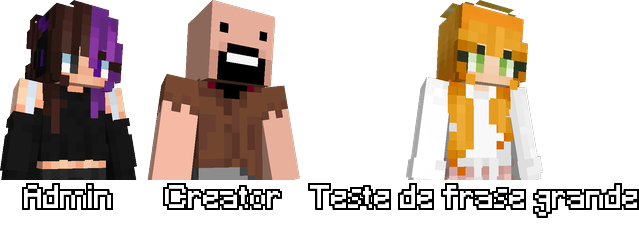
Crie imagens compostas com múltiplas skins de Minecraft usando o endpoint POST de composição.
Endpoint
POST http://nebulaapi.squareweb.app/api/minecraft/render/composition
Envie um array JSON com até 10 itens (nicks ou URLs de skins) e receba um PNG composto com fundo transparente.
Formato da requisição
Cada item do array pode ter:
| Campo | Tipo | Obrigatório | Descrição |
|---|---|---|---|
value | string | ✓ | Nick do jogador ou URL da skin |
type | string | — | "nick" ou "url" (auto-detectado se omitido) |
label | string | — | Texto abaixo da skin (padrão: nick ou vazio) |
Exemplos
Exemplo 1: Múltiplos nicks
[
  {"value": "St4rx3"},
  {"value": "Notch"},
  {"value": "Dinnerbone"}
]
Exemplo 2: Labels customizados
[
  {"value": "St4rx3", "label": "Admin"},
  {"value": "Notch", "label": "Criador"},
  {"value": "jeb_", "label": "Desenvolvedor"}
]
Exemplo 3: Skin por URL
[
  {
    "value": "https://textures.minecraft.net/texture/...",
    "type": "url",
    "label": "Skin Custom"
  },
  {"value": "Notch"}
]
Exemplo 4: Nicks + URLs
[
  {"value": "St4rx3", "label": "Jogador 1"},
  {
    "value": "https://textures.minecraft.net/texture/...",
    "type": "url",
    "label": "Skin Custom"
  }
]
⚠️ Limitações:
- Máximo de 10 itens por requisição
- URLs usam modelo "steve" automaticamente
- Imagem com fundo transparente, skins alinhadas horizontalmente
Como usar
cURL
curl -X POST http://nebulaapi.squareweb.app/api/minecraft/render/composition \
  -H "Content-Type: application/json" \
  -d '[
      {"value": "St4rx3"},
      {"value": "Notch"}
  ]' \
  --output composition.png
Python
import requests

url = "http://nebulaapi.squareweb.app/api/minecraft/render/composition"
data = [
    {"value": "St4rx3", "label": "Admin"},
    {"value": "Notch", "label": "Creator"}
]
resp = requests.post(url, json=data)
with open("composition.png", "wb") as f:
    f.write(resp.content)
JavaScript / Fetch
fetch('http://nebulaapi.squareweb.app/api/minecraft/render/composition', {
  method: 'POST',
  headers: { 'Content-Type': 'application/json' },
  body: JSON.stringify([
    {value: 'St4rx3', label: 'Admin'},
    {value: 'Notch', label: 'Creator'}
  ])
})
.then(r => r.blob())
.then(blob => {
  const url = URL.createObjectURL(blob);
  const img = document.createElement('img');
  img.src = url; document.body.appendChild(img);
});
Resposta
PNG com fundo transparente, labels centralizados e espaçamento automático.
Pré-visualização